
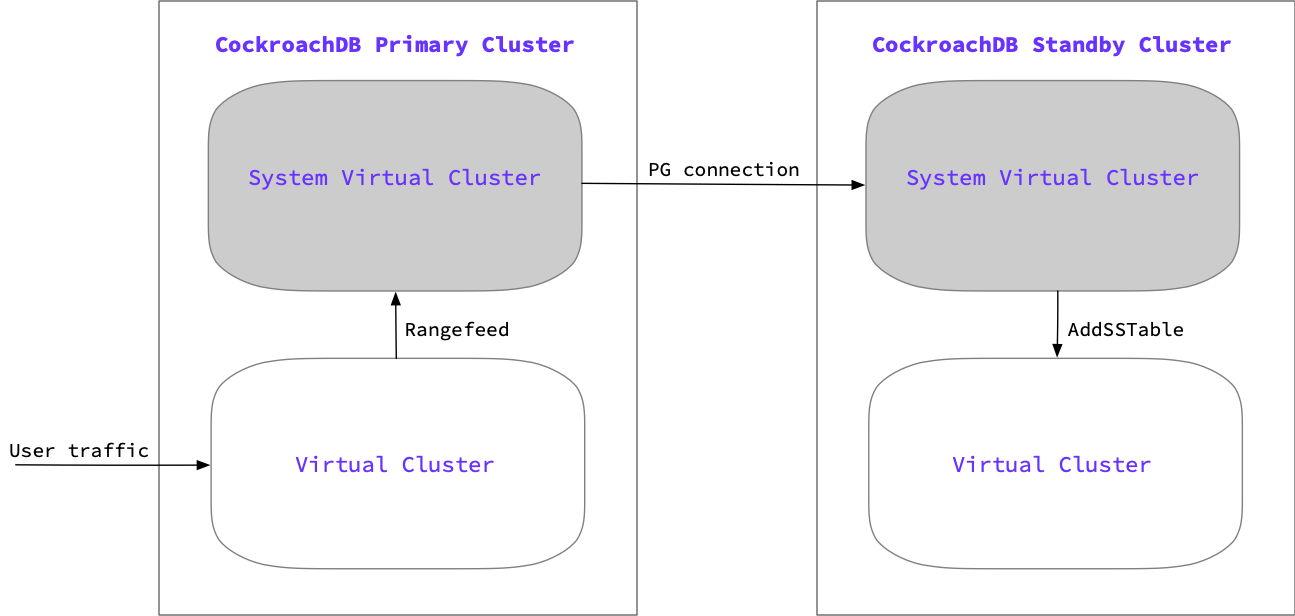
Physical cluster replication (PCR) continuously and asynchronously replicates data from an active primary CockroachDB cluster to a passive standby cluster. When both clusters are virtualized, each cluster contains a system virtual cluster and an application virtual cluster during the PCR stream:
- The system virtual cluster manages the cluster's control plane and the replication of the cluster's data. Admins connect to the system virtual cluster to configure and manage the underlying CockroachDB cluster, set up PCR, create and manage a virtual cluster, and observe metrics and logs for the CockroachDB cluster and each virtual cluster.
- The application virtual cluster manages the cluster’s data plane. Application virtual clusters contain user data and run application workloads.
If you utilize the read on standby feature in PCR, the standby cluster has an additional reader virtual cluster that safely serves read requests on the replicating virtual cluster.
PCR stream start-up sequence
Starting a physical replication stream consists of two jobs: one each on the standby and primary cluster:
- Standby consumer job: Communicates with the primary cluster via an ordinary SQL connection and is responsible for initiating the replication stream. The consumer job ingests updates from the primary cluster producer job.
- Primary producer job: Protects data on the primary cluster and sends updates to the standby cluster.
The stream initialization proceeds as follows:
- The standby's consumer job connects to the primary cluster via the standby's system virtual cluster and starts the primary cluster's
REPLICATION STREAM PRODUCERjob. - The primary cluster chooses a timestamp at which to start the physical replication stream. Data on the primary is protected from garbage collection until it is replicated to the standby using a protected timestamp.
- The primary cluster returns the timestamp and a job ID for the replication job.
- The standby cluster retrieves a list of all nodes in the primary cluster. It uses this list to distribute work across all nodes in the standby cluster.
- The initial scan runs on the primary and backfills all data from the primary virtual cluster as of the starting timestamp of the replication stream.
- Once the initial scan is complete, the primary then begins streaming all changes from the point of the starting timestamp.
Start-up sequence with read on standby
This feature is in preview and subject to change. To share feedback and/or issues, contact Support.
You can start a PCR stream with the READ VIRTUAL CLUSTER option, which allows you to perform reads on the standby's replicating virtual cluster. When this option is specified, the following additional steps occur during the PCR stream start-up sequence:
- The system virtual cluster on the standby also creates a
readonlyvirtual cluster alongside the replicating virtual cluster. Thereadonlyvirtual cluster will be offline initially. - After the initial scan of the primary completes, the standby's replicating virtual cluster has a complete snapshot of the latest data on the primary. The PCR job will then start the
readonlyvirtual cluster. - When the startup completes, the
readonlyvirtual cluster will be available to serve read queries. The queries will read from historical data on the replicating virtual cluster. The historical time is determined by thereplicated_timeof the PCR job (the latest time at which the standby cluster has consistent data). Thereplicated_timewill move forward as the PCR job continues to run.
During the PCR stream
The replication happens at the byte level, which means that the job is unaware of databases, tables, row boundaries, and so on. However, when a failover to the standby cluster is initiated, the replication job ensures that the cluster is in a transactionally consistent state as of a certain point in time. Beyond the application data, the job will also replicate users, privileges, basic zone configuration, and schema changes.
During the job, rangefeeds are periodically emitting resolved timestamps, which is the time where the ingested data is known to be consistent. Resolved timestamps provide a guarantee that there are no new writes from before that timestamp. This allows the standby cluster to move the protected timestamp forward as the replicated timestamp advances. This information is sent to the primary cluster, which allows for garbage collection to continue as the replication stream on the standby cluster advances.
If the primary cluster does not receive replicated time information from the standby after 24 hours, it cancels the replication job. This ensures that an inactive replication job will not prevent garbage collection.
Failover and promotion process
The tracked replicated time and the advancing protected timestamp allow the replication stream to also track retained time, which is a timestamp in the past indicating the lower bound that the replication stream could fail over to. The retained time can be up to 4 hours in the past, due to the protected timestamp. Therefore, the failover window for a replication job falls between the retained time and the replicated time.

Replication lag is the time between the most up-to-date replicated time and the actual time. While the replication keeps as current as possible to the actual time, this replication lag window is where there is potential for data loss.
For the failover process, the standby cluster waits until it has reached the specified failover time, which can be in the past (retained time), the LATEST timestamp, or in the future. Once that timestamp has been reached, the replication stream stops and any data in the standby cluster that is above the failover time is removed. Depending on how much data the standby needs to revert, this can affect the duration of RTO (recovery time objective).
When a PCR stream is started with a readonly virtual cluster, the job will delete the readonly virtual cluster automatically if a failover is initiated with a historical timestamp. If the failover is initiated with the most recent replicated time, the readonly virtual cluster will remain on the standby cluster.
After reverting any necessary data, the standby virtual cluster is promoted as available to serve traffic and the replication job ends.
For details on failing back to the primary cluster following a failover, refer to Fail back to the primary cluster.
Multi-region behavior
You can use PCR to replicate between clusters with different cluster regions, database regions, and table localities. Mismatched regions and localities do not impact the failover process or ability to access clusters after failover, but they do impact leaseholders and locality-dependent settings. Clusters replicating across different regions may also experience a slight decrease in performance due to longer replication times.
If the localities on the primary cluster do not match the localities on the standby cluster, the standby cluster may be unable to satisfy replicating locality constraints. For example, if a replicated regional by row table has partitions in us-east, us-central, and us-west, and the standby cluster only has nodes with the locality tags us-east and us-central, the standby cluster cannot satisfy the regional by row us-west partition constraint. Data with unsatisfiable partition constraints is placed in an arbitrary location on the standby cluster, which can cause performance issues in the case of a failover event due to latency between regions.
After a failover event involving clusters in different regions, do not change any configurations on your standby cluster if you plan to fail back to the original primary cluster. If you plan to start using the standby cluster for long-running production traffic rather than performing a failback, adjust the configurations on the standby cluster to optimize for your traffic. When adjusting configurations, ensure that the new settings can be satisfied on the standby cluster. In particular, ensure that the cluster does not have pinned leaseholders for a region that does not exist on the cluster.
